
People often treat file organization as a choice between two extremes:
- Dump everything into Downloads or on the Desktop.
- Create an elaborate folder hierarchy that requires endless clicking.
Neither approach works particularly well.
Over time, I’ve found that the goal isn’t perfect organization. It’s reducing friction when you need to find a file later. The best file systems combine folder structure and search. The key is knowing when each method works best.
Download the File Retrieval Reference
I’ve created a File Retrieval Methods reference table that summarizes the concepts discussed in the video.
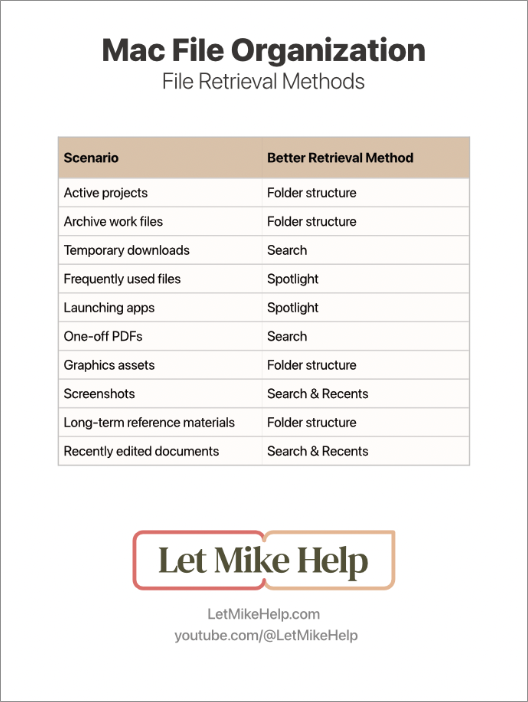
Download File Retrieval Methods Table
1. Avoid File Dumping
A cluttered Downloads folder or Desktop creates retrieval problems later.
Common signs of file dumping include:
- Hundreds of files in Downloads
- A Desktop covered with documents and screenshots
- Difficulty finding files after a few weeks
Instead of relying on memory, create an intentional retrieval system.
2. Avoid Over-Organizing
Organization can become its own source of friction.
Warning signs include:
- Excessive folder nesting
- Creating a folder for every small category
- Spending more time organizing than using your files
- Maintaining duplicate copies of files in multiple locations
The problem usually isn’t storage. The problem is retrieval.
If it takes too many clicks to find something, your structure may be working against you.
3. Use Folder Structure for Long-Term Storage
Folder structures are especially useful for:
- Active projects
- Archived client work
- Reference materials
- Digital assets
- Templates
- Stock photos and graphics
Sometimes you don’t remember a filename.
Instead, you remember:
- The project
- The timeframe
- The general location
That’s where folder structures shine.
4. Use Search to Reduce Navigation Friction
Search doesn’t replace folders. Search reduces navigation friction.
Spotlight is useful for:
- Launching apps
- Finding recently used files
- Opening folders quickly
- Performing calculations and conversions
Finder search can also help narrow results to a specific folder structure before expanding the search to your entire Mac.
Configure Finder to Search the Current Folder
- Open Finder.
- Choose Finder → Settings.
- Select the Advanced tab.
- Under When performing a search, choose Search the Current Folder.
This allows you to start with a focused search and expand only when necessary.
5. Name Files for Your Future Self
One of the simplest ways to improve retrieval is through better filenames.
When naming a file, ask:
What words will I think of when I’m looking for this next year?
Use descriptive names whenever possible.
You can also add additional keywords to a file’s Comments field.
Add Keywords to a File
- Right-click the file.
- Choose Get Info.
- Locate the Comments field.
- Add words you may use to search for the file later.
Think about how your future self will look for the file.
A good file system should survive your future self.
6. Build a Folder Structure That Works for You
There is no universal folder structure that works for everyone.
Use other people’s systems as inspiration, but create a structure that matches the way you think.
A few guidelines:
- Start with 5–6 broad top-level categories.
- Create subfolders only when they provide real value.
- Challenge yourself before creating additional folder levels.
- Keep navigation simple.
Your goal is not perfection.
Your goal is finding files with the least amount of friction.
7. Things I Avoid
Personally, I try to avoid:
- Excessive folder nesting
- Over-categorization
- Permanently storing temporary files
- Folder structures based primarily on dates
Files already contain timestamps in their metadata. In many cases, that information is more useful than manually creating date-based folder hierarchies.
Bottom Line
Folder structures are not obsolete.
Search doesn’t solve everything.
The most effective approach combines both.
Use folders where context matters. Use search where speed matters. Build a system that helps your future self find files quickly and with as little friction as possible.