
Shopping for a monitor can be confusing. There are so many specifications that are unclear without perspective. Let’s cover the important ones so you have greater confidence while you shop.
Download the Free Display Guide
Download and save this handout for a quick reference while you’re shopping.
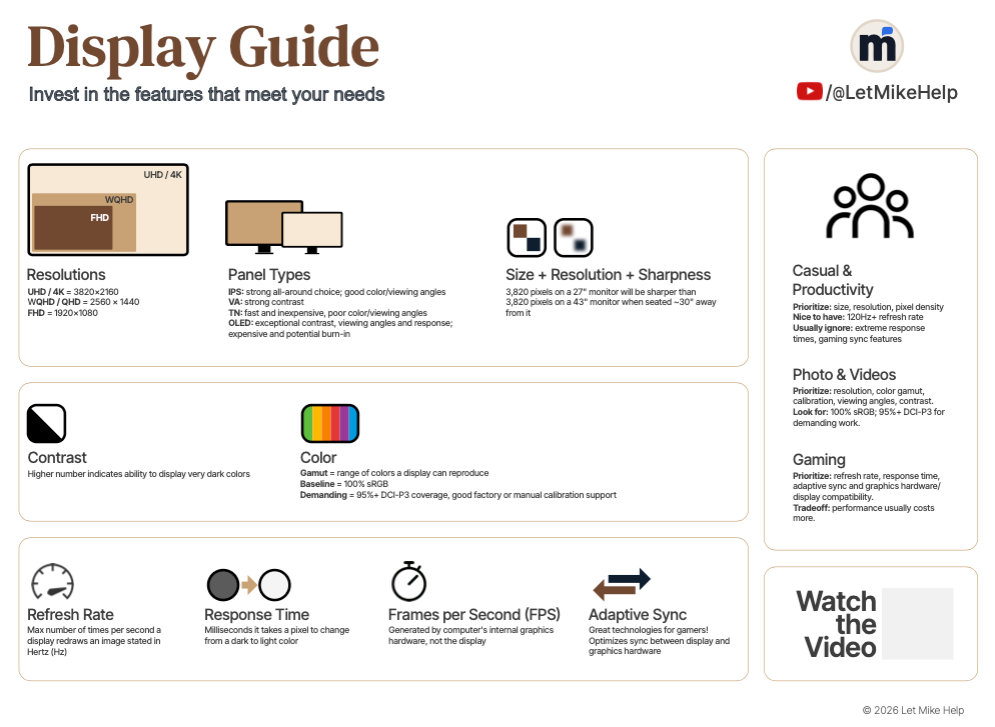
The handout includes:
- Key specifications you need to know
- What’s important to different kinds of users
Save it. Then print it or keep it on your phone while you’re shopping.
This video steps you through the key specifications clearly, and it offers you the perspective you’ll want to know.
Understand the Specs
There can be a lot of confusion about the myriad specifications on many product boxes and product pages on retailers’ websites. Here are the important specs with some perspective so you have confidence to choose the right display for you.
Ratios
- 16:9 is the ratio of nearly all televisions and monitors available today.
- Ultrawide monitors can offer aspect ratios like 21:9 and 32:9. These offer wider screen real estate without making the monitor taller.
Common Resolutions
Pixels measured horizontally and vertically. Here are the three most common ones.
- Full High Definition aka FHD
- 1920 x 1080 pixels
- Essentially the base standard for modern displays
- Nickname: HD or 1080p
- Wide Quad High Definition aka WQHD
- WQHD = QHD. Marketers popularized the W for “wide”
- 2560 x 1440 pixels
- 4 times the resolution of HD 720p
- Ultra High Definition
- 3840 × 2160 pixels
- 4 times the resolution of FHD 1080p
- Nickname: 4K
Screen Sizes
- Traditional 16:9 displays
- 23, 24, 27 and 32 inches (measured diagonally)
- Extra-wide Sizes
- Ratios of 21:9 or 32:9 for 1.5- or 2-times horizontal width at same height.
Refresh Rate vs Frames Per Second
- Don’t confuse response time with frames per second
- Refresh rate measures the maximum number of times per second a display redraws an image stated in Hertz (Hz)
- 60Hz, 120Hz, 144Hz, 240Hz are common
- FPS is generated by the internal hardware or game console
But let me say that 120Hz and higher makes even your mouse pointer float smoothly across your screen and the window content stays clear when moving windows. It really is a nice experience.
Response Time
- Don’t confuse this with refresh rate.
- The time in milliseconds it takes a pixel to go from a dark gray level to bright gray (commonly GtG)
- Think almost black to almost white which is better real-world test than pure black to pure white.
- Smaller numbers are faster and better
Contrast
- Higher contrast indicates ability to display darker images
- 5000:1 produces a deeper black than 1000:1 (not that the latter is a poor contrast ratio!)
Panel Type
- IPS
- In-Plane Switching
- Better color accuracy
- Better viewing angles
- Usually offers lower contrast
- VA
- Vertical Alignment
- Can offer higher contrast
- TN
- Twisted Namatic
- Offers high refresh rates and response times at lower costs.
- Has limited color accuracy and lower contrast ratio
BTW, the names indicate the technology used to align liquid crystal molecules in the display substrates. But that is a topic … for another channel, actually.
- OLED
- Organic light-emitting diode
- It’s beautiful!
- Pure black and very high contrast
- Wide viewing angles
- Fast response times
- Expensive
- Burn-in risk when screen image does not change often (think a clock at the edge of your screen)
- Organic material to produce blue colors degrades faster affecting color over time (bet you didn’t know that one)
Specific Technologies with Specific Benefits
- Nvidia G-Sync, AMD Freesync, others
- Proprietary adaptive display sync technologies to reduce screen tearing for gaming scenarios.
Common Uses & Users
- Simple Productivity
- For basic computing, an inexpensive display is all you need. Shop to find the best size and resolution that you find pleasing … and go about your day.
- Professional Photo & Video Editing
- If you need color accuracy, an IPS or OLED will serve those needs very well.
- Gaming
- These folks are demanding. Gamers must balance top performance among nearly all of these specs against the weight of their wallets.
Conclusion
I know that was a lot to take in. So download the Display Guide for reference. Keep it on your phonewhen you’re shopping for your new monitor. Good luck!